










.jpg?width=2000&name=lyyti-future_of_events_2025-epicenter-photos-brave_teddy-web-3%20(1).jpg)
The mindset participants arrive with can have a major impact on the success of an event. An event app can help engage your audience with the topic before the event even begins, activate participants during the event, and continue the learning and connections afterwards. In this use case, we explore how to design the entire participant journey, using an expert event like Lyyti’s Future of Events as an example.
Event communication should be integrated into event planning from the very beginning. In addition to email, you may use text messages and personal outreach. For many organisers, an event app may be a newer addition to this mix. Without overlooking the importance of email and other communication channels, let’s explore how an event app can become part of the event experience.
At its best, an event app supports the entire participant journey. It helps build anticipation, prepares participants for what is to come, lowers the threshold for networking, encourages active participation and helps turn insights from the event into action.
Let’s look at what this could mean in practice at an event focused on learning and networking.
Starting point: your audience doesn’t arrive in a vacuum
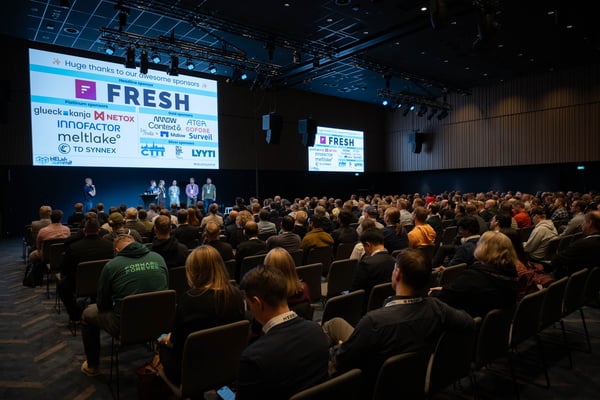
Future of Events is a half-day expert event designed to offer participants new perspectives and spark discussion about the future of the industry. The programme includes presentations, collaborative exercises and time for networking.
The content can be excellent, but its impact doesn’t depend solely on the speakers or the programme. The mindset participants arrive with matters too.
Do they arrive straight from a busy morning without really knowing what to expect? Do they simply sit back and passively follow the programme? When it’s time to network, do they end up talking only to people they already know?
Or have they already had a moment to think about the theme, identify what they personally want to learn and consider what they would like to discuss with other participants?
An event organiser cannot control a participant’s mindset. But they can create the right conditions for it. This is where an event app can become more than just an information channel: it can also be a tool for preparation and engagement.
1. Planning: Start with the change you want to create
Before planning the content for the app, define what you want the event to achieve.
At an event focused on learning and networking, the goal might be for participants to:
- understand the topic from a new perspective
- identify one thing they want to change in their own work
- have at least one meaningful conversation with someone new
- leave the event with a concrete next step.
Once the desired change is clear, it becomes easier to define the role of the app. You don’t need to use every possible feature. The key is to choose the content, questions and forms of interaction that support the specific objectives of your event.
2. Registration: Collect insights to design the experience
The participant journey begins at registration. In addition to standard contact information, organisers can ask questions such as:
- What would you like to learn at the event?
- What question related to the topic is particularly relevant to you right now?
- What theme would you like to discuss with other participants?
The answers help organisers understand where their audience is starting from. They can be used to refine the programme, brief speakers, plan discussion themes and shape post-event communication.
The answers can also be used later as content in the event app. Based on them, you can create short messages or polls, or encourage participants to connect around particular topics.
Simply answering these questions already encourages participants to articulate why they are attending. Registration then becomes more than reserving a place – it becomes the first step towards active participation.
3. Before the event: get participants into the right mindset
Pre-event communication often focuses on practical information: arrival instructions, schedules and dietary requirements. These are important, but they don’t necessarily prepare participants to learn or connect with others.
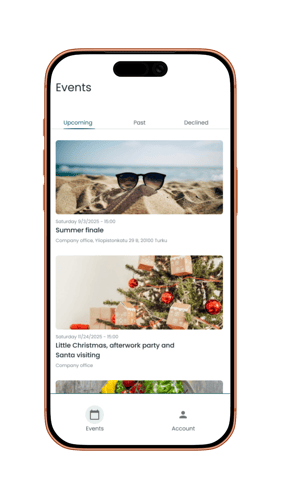
In the Lyyti Event app, participants can see the events they have registered for, access event information and their ticket, and take part in event-specific discussions and polls. These touchpoints can also be used to engage the audience before the event.
A few days before the event, for example, you could publish a thought-provoking question:
What assumption about this topic are you ready to challenge?
The purpose of the question isn’t simply to collect answers. It encourages participants to pause and think about the topic – and gives them a reason to open the app before the event day.
Another option is to turn their attention towards networking:
What would you like to discuss with other participants?
The answers can be highlighted in a shared discussion within the app or incorporated into the facilitation on the event day. This means networking doesn’t have to start from zero: participants already have some idea of the questions and interests shared by the people in the room.
Push notifications should also be used thoughtfully. A good pre-event message doesn’t simply remind people that the event is coming up; it sparks curiosity. A provocative statement from a speaker, a short pre-event task or an insight drawn from participants’ responses can prepare the audience for the content far more effectively than another programme reminder.
4. Arrival: remove friction and free up attention for what matters
On the event day, the app’s first job is to make participation easy. When the ticket, address, schedule and latest instructions are all available in one place, participants don’t have to search through their emails for information.
This also affects the overall experience. Unclear arrival instructions, a missing ticket or a last-minute programme change can divert attention away from the event itself. A smooth start helps participants move from dealing with practicalities to being fully present.
At the beginning of the event, you can also return to the pre-event question. The organiser could show a summary of the responses, ask participants to discuss them with the person sitting next to them, or use a few key observations to frame the day’s programme. This creates a visible connection between pre-event engagement and the shared experience in the room.
5. During the event: turn listeners into participants
Learning doesn’t happen through receiving information alone. Participants need opportunities to process what they hear, compare it with their own experiences and listen to different perspectives.
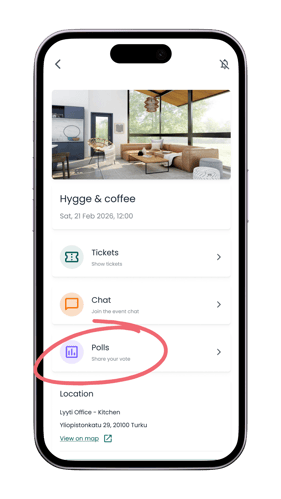
Polls in the app can be used to:
- understand the audience’s perspective before a presentation
- see whether their thinking changed during the session
- ask participants to identify their most important insight
- collect questions or themes for discussion
- identify topics participants would like to explore further.
However, a poll shouldn’t be added simply for the sake of interaction. Every question should have a purpose within the event’s dramaturgy. It should direct attention, deepen thinking, help participants apply what they have learned or provide the organiser with information that can be used in the next stage of the journey.
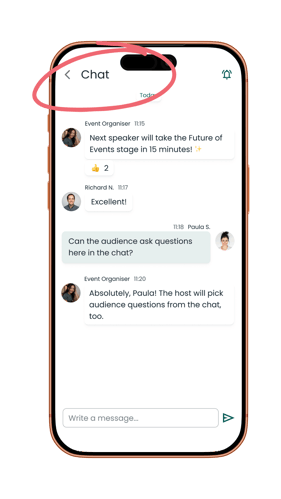
An event-specific chat can also support networking. The organiser could start a conversation by asking what expertise participants are looking for or what they themselves can offer others. Themes emerging from presentations can also be brought into the discussion, encouraging participants to continue the conversation during breaks.
The app doesn’t replace face-to-face interaction. Its role is to give people a reason to connect and make that first conversation easier to start.
6. At the end of the event: turn an insight into a next step
The end of an event is a critical moment in the participant journey. Without a moment to reflect, interesting ideas from the day can easily remain disconnected notes, while everyday life takes over before participants even get home.
Before participants leave, the app could ask:
What is the one thing from this event that you will put into practice?
The question helps participants identify their own next step. At the same time, the answers give organisers insight into which content participants found most useful and what kind of change the event may have set in motion.
This is also a good moment to capture a quick reaction or impact rating. A more extensive feedback survey can be sent later, but an immediate response helps you understand how participants experienced the event while it is still fresh in their minds.
7. After the event: continue the learning and connections
An event shouldn’t end with the final presentation. And post-event communication shouldn’t consist solely of a thank-you message and a link to the materials.
A strong follow-up journey reconnects participants with their own goals. For example, your communication can:
- remind participants of the commitment or next step they identified at the end of the event
- share a summary of the audience’s most important insights
- encourage them to continue conversations with other participants
- provide deeper content based on their interests
- invite them to another relevant event.
If participants were asked before the event which assumption they were ready to challenge, you can return to the same question afterwards: did anything change?
This allows participants to see their own journey, while giving organisers insight into how the event may have influenced their thinking.
8. Measurement: look at the entire journey, not just one number
An event app generates different signals of participation: responses to polls, discussions and feedback. These shouldn’t be treated as isolated usage statistics, but evaluated in relation to the event’s objectives.
If the goal was to encourage networking, the important questions are whether conversations took place and whether participants felt they made relevant connections. If the goal was learning, you can compare the questions participants had before the event with the insights and actions they identified at the end.
The results can then inform the design of your next event:
- What kind of pre-event engagement encouraged people to respond?
- Which questions sparked discussion?
- At what point did participation begin to drop?
- Which content led to concrete follow-up actions?
This way, the data generated through the app doesn’t simply end up in a report. It feeds directly back into the planning of the next event.
The most important job of an event app isn’t telling participants what happens next
The value of an event app shouldn’t be assessed solely through a list of features or the number of downloads. A more important question is what the app helps change in the way participants think and act.
Does it help them arrive better prepared? Does it make starting a conversation easier? Does it encourage them to actively process new information? Does it help turn inspiration into action?
An app alone won’t make an event impactful. But when designed thoughtfully, it can connect the different stages of an event into one coherent experience – from registration to preparation, from the event day to follow-up, and from the first question to concrete change.
That’s why planning the role of an event app should begin with this question:
How do we want participants to think, feel and act before, during and after the event – and how can technology help us make that happen?
Use case summary: learning and networking event
| Stage of the participant journey | Objective | How to use the app |
|---|---|---|
| Registration | Understand participant needs | Collect learning goals or relevant questions |
| Before the event | Spark curiosity and prepare the audience | Pre-event polls, conversation starters and thoughtful push notifications |
| Arrival | Remove practical friction | Ticket, event information, schedule and up-to-date instructions |
| During the event | Encourage learning and interaction | Polls, shared chat and discussion themes |
| End of the event | Turn insights into intentions | Ask participants to identify one thing they will put into practice |
| After the event | Support follow-up and continued learning | Summaries, materials, continued discussions and targeted next steps |
| Planning the next event | Improve the concept through data | Analyse participation, feedback and achievement of event objectives |
.jpg?width=600&name=lyyti-future_of_events_2025-epicenter-photos-brave_teddy-web-13%20(1).jpg)
Why Event Participation Matters More Than Registration Numbers
4 Truths About Successful Events - Part 1/3: Participant Experience
Customer story – HELish Summit grew to 320 participants with the whole event managed in one place

Top 8 Event Management Tips Every Planner Should Know