








.jpg?width=2000&name=IMG_6482%20(1).jpg)
Case: How I organised a 45-person Lyyti Challenge in Oslo in six hours
Organising an event takes a tremendous amount of time. It requires both rigorous project management and creative thinking. You need to stay within budget, keep to the schedule and always come up with something worthy of your participants’ time.
Lyyti Challenge is our annual staff event — and one that comes with high expectations. This year, I organised it in Oslo, the home city of our new owner, SuperOffice.
This is the practical story of how I organised Lyyti Challenge for 45 Lyyti employees in Oslo without spending weeks preparing and with a budget that, unfortunately, did not stretch to outsourcing the work to an event agency. I always advocate bringing in professionals, but this time the cost of travel left no room in the budget for external support.
The starting point: a tight budget and high expectations
At Lyyti Challenge, Lyyti employees compete in teams, completing a variety of challenges. The Oslo edition was particularly special because colleagues from SuperOffice were also taking part. I wanted to create an event people would genuinely remember.
The problem was that I did not know Oslo, nor did I have time to conduct extensive research on location. So, I decided to take a small risk and see how far AI could take me.
Step 1: Developing the concept while walking
I was on a business trip in Oslo a couple of months before the event. As I walked to a restaurant one evening, I enlisted the help of my “personal AI assistant”, Reiska.
Reiska is what I call ChatGPT. I talk to it while I walk, using the conversation to bounce around ideas for the event concept.
I explained what Lyyti Challenge was, what needed to happen on the Saturday and what constraints I was working with: no external service providers, no expensive activities, but still a competitive, entertaining, full-day urban adventure. Something inspired by The Amazing Race, completed on foot or by public transport.
Reiska gave me a strong framework: teams, ideas for checkpoints around the city, suggested challenges for each location and an outline for the scoring system.
This took 15 minutes.
Step 2: The map, checkpoints and challenges — Claude lends Reiska a hand
Once the concept was clear, I moved over to Claude Cowork the following day. I gave it the output from my ChatGPT session and asked it to turn the concept into something concrete.
Claude identified suitable checkpoint locations around Oslo. It calculated distances, estimated travel times and suggested the best way to move between locations — on foot, by tram or by bus. It then created a table showing staffed and self-guided checkpoints, challenge instructions, scoring logic and practical guidance.
Claude created around 20 checkpoints. It found the addresses, refined the challenges, defined the scoring criteria and provided instructions for moving between locations. I asked it to compile everything into a single Excel document.
I then asked for an interactive Google Maps map. Claude built a map with all the checkpoints marked, including brief instructions and the available points in each marker. This became the teams’ navigation tool on the day of the event.
It would probably have taken me a full day just to learn how to use all the relevant Google Maps features. Claude produced the whole thing in five minutes.
It also created a printable A4 instruction pack. This included checkpoint-specific instructions, detailed descriptions of each challenge, guidance on how to submit an answer or photograph and an explanation of what was required to earn full points.
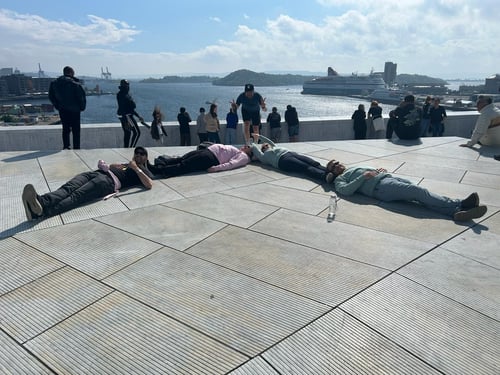 As per instructions, the team is organised in the shape of an arrow pointing towards the fjord on top of the Opera House.
Step 3: Pre-event challenges for the teams
wanted the teams to start building their team spirit before arriving in Oslo. Claude suggested five pre-event challenges:
-
A team name and its story
-
A team flag
-
A team look and coordinated outfits
-
A team motto and chant
-
A Norwegian-language video in which every team member says one sentence in Norwegian
Each challenge was scored by local judges.
Claude also created a packing list detailing what each team needed to bring on the day.
I received all of this in a single Word document. After some light editing, it was ready to share directly with the team leaders.
Step 4: Volunteer instructions and a picnic
Local SuperOffice employees signed up as volunteers through Lyyti. They contributed ideas based on their local knowledge, and I fed those ideas into Claude.
I gave Claude the list of volunteers and their suggestions from Lyyti. Claude allocated people to different checkpoints and created checkpoint-specific instructions explaining how to award points, what to observe and how to manage each location.
One of the highlights of the day was a Norwegian picnic. Claude created the instructions for the teams, including the budget — which I decided myself — and suggestions for typical Norwegian foods.
.jpeg?width=500&height=667&name=WhatsApp%20Image%202026-08-14%20at%2010.45.22%20(1).jpeg)
Step 5: Real-time scoring
On the day of the event, the teams explored Oslo. We used the Lyyti Event App for internal communication, but I wanted a private channel for submitting answers. Each team shared its live location with me and sent its checkpoint answers via WhatsApp.
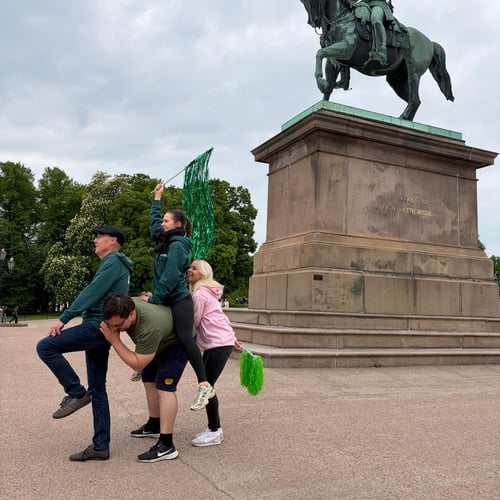 Bring it on -tiimi jäljentämässä Karl Johan -monumenttia
I kept an Excel scoring sheet, created with Claude’s help, open throughout the day and updated it as the answers came in. Ready-made apps exist for this too, but my DIY, money-saving version worked perfectly well.
The result: our best EVS ever
The event achieved the highest Lyyti Challenge Experience Value Score, or EVS, we have ever received!
Here are a few honest observations about where AI succeeded and where it did not.
What worked exceptionally well:
-
The checkpoint locations and addresses were accurate
-
The travel-time estimates were reliable
-
The recommended modes of transport made sense
-
The challenge ideas were entertaining and practical
-
The documents were nearly print-ready after some light editing
What did not work:
Real-time opening information: one location was closed because of another event. One out of the 20 checkpoints, therefore, had to be dropped at the last minute.
I spent approximately 15 minutes working with ChatGPT — or Reiska — and around four to six hours working with Claude. Altogether, the entire planning process took less than one working day.
Without AI, I estimate that I would either have needed help from a local event agency — I did request a quote, but the price was, by Norwegian standards, “reasonably” high, meaning several hundred euros per participant — or I would have spent at least a week doing everything manually myself.
What AI did not do
It did not create the atmosphere at the starting area. It did not replace the experience of the teams exploring Oslo while working out the best possible route. It did not prepare the wonderful food at the Norwegian picnic. It did not recreate the feeling at the finish line after an amazing but exhausting day. And it certainly did not lift the atmosphere through the roof at dinner or at the nightclub afterwards.
But it sure as hell helped me plan all of it!
The experience taught me that AI does not necessarily need to be built into a single system. It is worth using different tools creatively and choosing each AI platform for the purpose it serves best.
I used ChatGPT because I have trained it to work as my personal assistant, allowing me to get things done through conversation. But when I needed to produce documents such as spreadsheets, Word files and slides, Claude was much better suited to the job. Claude was also able to create the Google Maps map directly, which I could not get ChatGPT to do.
Be bold and experiment with AI in planning and ideation. But remember: DO NOT SHARE PERSONAL DATA WITH AI unless you are using a closed system and your organisation’s policies explicitly allow it.

Rewriting the rulebook on events and event management software - the launch of Lyyti Next Gen
Customer Story - How Wärtsilä uses events to build customer relationships worldwide
Customer story – HELish Summit grew to 320 participants with the whole event managed in one place
What happens when we connect insights from over a million events to our upcoming AI?